Laser Cutting

Two laser cutters, three lasers—triple the beams for your greatest schemes!

HackPGH’s laser shop area is a dedicated, ventilated workspace equipped with two laser engraving machines: Trogdor, our custom 100 W CO₂ laser, and our new xTool F2 Ultra dual diode/fiber laser. Read more about both below.

Trogdor handles large-format CO₂ laser cutting and engraving. The xTool F2 Ultra adds a compact, enclosed workstation with separate diode and MOPA fiber lasers for fine detail, metal work, and repeatable batches.

Material compatibility depends on both the machine and the exact composition of the material. Choose the laser during job planning and confirm anything uncertain with a Laser Cutting Shop Lead.

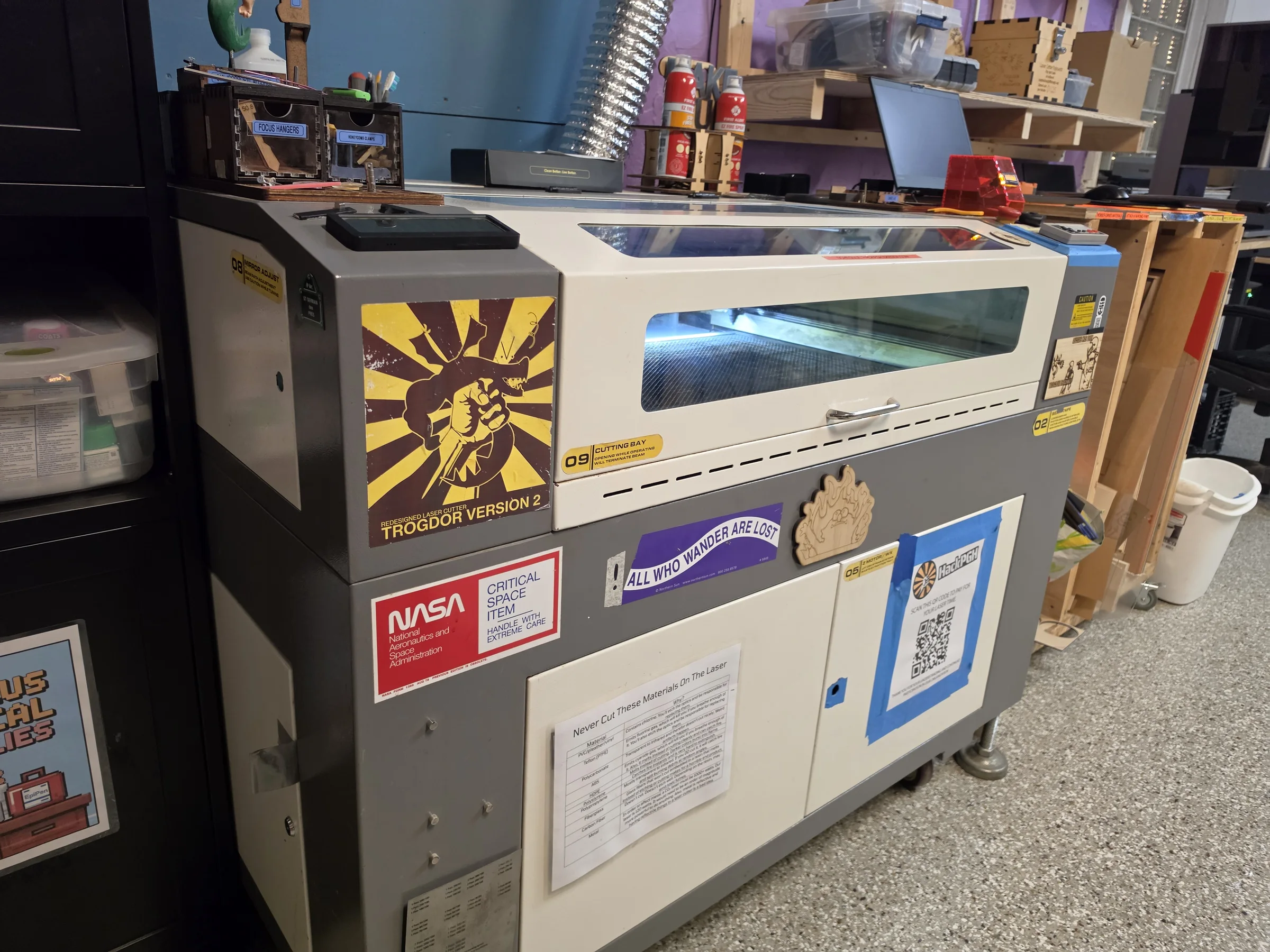
Trogdor, HackPGH’s custom CO2 laser cutter and engraver
Trogdor, HackPGH’s large-format CO₂ laser

Large-format CO₂ laser cutter & engraver

Trogdor

Trogdor is a heavily upgraded industrial laser that HackPGH has customized over many years. Its 100 W CO₂ tube and large work area make it the shop’s choice for signs, boxes, artwork, templates, and prototypes in approved non-metal materials.

It can also engrave granite with the correct setup. Larger workpieces can fit through the front and rear pass-throughs, though the laser cannot cut metal.

Read the Trogdor usage guide
Laser power
100 W CO₂
Work area
900 × 600 mm (35.4 × 23.6 in.)
Lens
50.8 mm
Software
LightBurn on the Trogdor Laser Laptop
Oversized work
Front and rear pass-throughs
HackPGH’s xTool F2 Ultra laser workstation with its laptop and air purifier
xTool F2 Ultra with its dedicated workstation

Diode & MOPA fiber laser engraver

xTool F2 Ultra

The xTool is an enclosed, high-precision workstation that combines two laser systems. Its diode laser handles approved non-metal cutting and engraving, while its MOPA fiber laser supports metal coloring, deep engraving, and other fine metal work.

Dual cameras provide a live workspace preview and automatic edge detection. For longer pieces and batch work, the conveyor expands the work area beyond the enclosed bed.

Lasers
40 W diode and 60 W MOPA fiber
Work area
220 × 220 mm (8.5 × 8.5 in.)
Conveyor work area
Up to 220 × 550 mm
Maximum speed
15,000 mm/s
Alignment
Dual 48 MP cameras with edge detection and 0.2 mm accuracy
Software
xTool Studio on the dedicated laptop
Air handling
Automatic exhaust and SafetyPro AP2 Max air filtration
Accessories
Conveyor belt and intelligent rotary

Access & Training

Training and clearance are required before members may operate the laser independently.

Before independent use

  • Learn the laser’s safety controls and required safety practices.
  • Demonstrate the complete startup and shutdown process.
  • Learn how to prepare, position, preview, and run a job in its software.
  • Know how to identify materials that are unsafe to laser.

Plan your session

Reserve the laser

Book every session in Skedda. Laser reservations are limited to four hours per day unless a Shop Lead or the Board approves more time for a long or complex project.

Reserve equipment

Materials

Material safety depends on the exact composition, not just how a sheet or object looks. Use only known, approved materials and ask a Laser Cutting Shop Lead before trying anything uncertain.

Common uses

Approved materials by machine

xTool F2 Ultra

Wood, natural leather, paper, and cardboard
Cut or engrave with the diode laser
Opaque acrylic
Cut or engrave with the diode laser
Stone
Engrave with the diode laser
Anodized or coated metal
Remove paint or coatings with calibration
Metal
Engrave with the MOPA fiber laser
Thin metal
Cut up to 2 mm with the MOPA fiber laser
Stainless steel and titanium
Color engraving requires precise calibration

Trogdor

Wood
Cuts and engraves
Acrylic
Cuts and engraves
Cardboard and paper
Cuts and engraves
Rubber
Confirm the exact material before use
Natural, vegetable-tanned leather
Cuts and engraves; expect odors
Granite
Engraving only
Coated metal
Marking only; Trogdor cannot cut metal

Never use

Cannot be cut on either machine

These materials are prohibited on both Trogdor and the xTool.

  • PVC and vinyl
  • Chrome-tanned leather
  • Synthetic or polyurethane leather (pleather / PU leather)
  • Teflon / PTFE
  • Polycarbonate / PC
  • ABS
  • HDPE
  • Polystyrene
  • Polypropylene
  • Glass
  • Fiberglass
  • Carbon fiber

Material Storage

The material cabinet between Trogdor and the xTool station has three sections. Use the section that matches your material so personal stock, shared offcuts, and acrylic for sale stay easy to identify.

Left section

Member Storage

Members may store sheets of acrylic and thin plywood in this section.

Center section

Up for Grabs

Put excess material here when you want to donate it for other members to use. Keep only offcuts that are large or useful enough for another project.

Useful offcuts only. Discard actual scrap.

Right section

Acrylic for Sale

Purchase acrylic kept in this section by the full sheet or half sheet.

Full sheet
$60
Half sheet
$30

Safe Use

Follow your training, the posted instructions, and current direction from Shop Leads.

Before starting

  • Confirm the material is permitted and suitable for laser processing.
  • Check the work area and toolhead path for leftover material or obstructions.
  • Verify the machine’s required cooling, exhaust, filtration, and air assist.
  • Preview and frame the job in the machine’s software before firing the laser.

Stay with the machine

Laser cutting creates a real fire risk. Watch the entire job and be ready to stop it immediately. If cooling or ventilation fails, the toolhead crashes, or the machine behaves unexpectedly, use the E-stop and contact a Shop Lead.

When finished

  • Complete the trained shutdown procedure.
  • Remove your material and waste from the bed.
  • Leave the machine and surrounding work area ready for the next member.
  • Pay for active laser time via the cash collection box or the online web store.